Full Bandicam Review: Is It Safe and Worth Buying?

Bandicam has long been a name in screen recording. You can record tutorials, gameplay, or save live streams with its capabilities. But does it still shine among its modern competitors? To find out, here's an honest Bandicam review. See here its recording modes, performance, pricing tiers, safety questions, and more. After the Bandicam review, explore its top alternative to decide if it's the right fit for your recording workflow.
Guide List
How Bandicam Was Tested What Is Bandicam Bandicam Review Bandicam Pricing Is Bandicam Safe to Use AnyRec Screen Recorder - For Users Where Bandicam Falls ShortHow Bandicam Was Tested
To give you a detailed assessment rather than claims, Bandicam was tested, including its performance and limitations. For the first part of the Bandicam review, here's a breakdown of how it is evaluated:
Tested Device:
- • Operating System: Windows 11
- • CPU: Intel Core i7-13700K
- • GPU: NVIDIA GeForce RTX 4070
- • RAM: 32GB DDR5 @ 5600MHz
- • Storage: 2TB NVMe PCIe
- • Monitors: Dual-monitor setup
Use Cases and Scenarios:
- 1. High FPS 4K Gaming. Its dedicated Game Recording Mode hooks straight into DirectX, allowing you to capture 4K footage at high framerates without taking a hit in-game performance.
- 2. Software Tutorials. The Screen Recording Mode is for quick educational content. Its real-time drawing, highlighting, and mouse-click effects make guides for your viewers to follow.
- 3. Webcam and Multi-Source Capture. Bandicam can handle dual-channel audio. It allows you to record desktop audio and your microphone at once and save them as separate tracks.
- 4. External Capture Card Recording. With the Device Recording Mode, you can use external hardware, making it simple for you to record consoles, webcam feeds, or phone screens.
What Is Bandicam
As you've just seen in the first part of the Bandicam screen recorder review, it is a high-performance Windows app designed to record screen activity, high FPS gameplay, and external video sources. It relies heavily on hardware acceleration technologies to offload heavy encoding directly to your GPU.
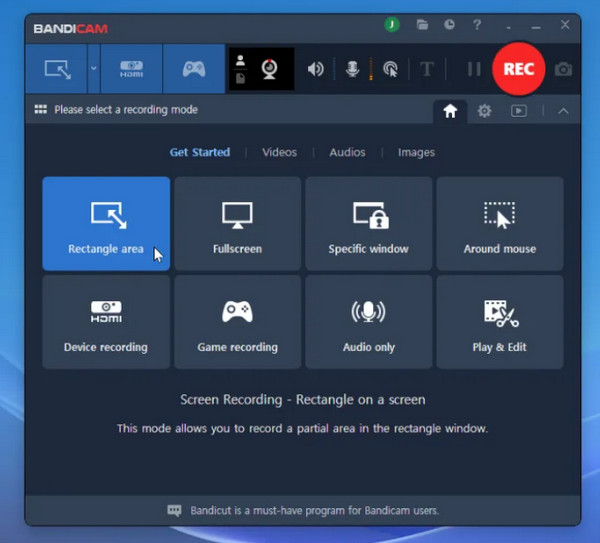
What is Bandicam software? To keep it simple, Bandicam organizes three core capture modes, each made for specific tasks.
1. Screen Recording Mode
This captures everything that's on your screen. You can capture in full screen, a specific window, or a customizable frame on your desktop. It features built-in annotation tools, like drawing, cursor highlight effects, and mouse clicks.
2. Game Recording Mode
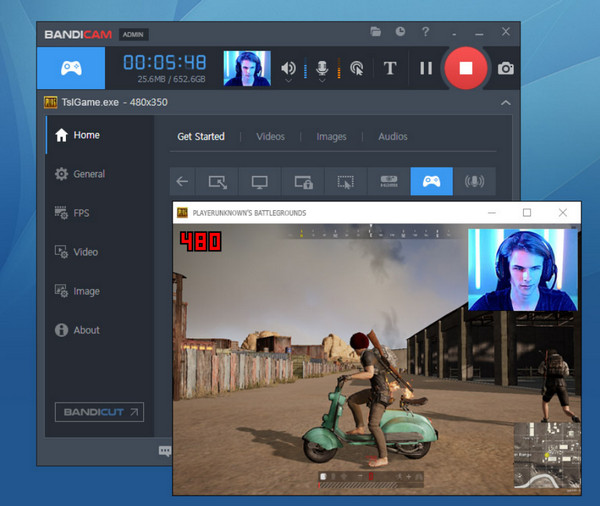
Designed primarily for 2D and 3D PC gaming, Bandicam game recorder hooks directly into the graphics API running the game process. Selecting the game frame captures at up to 480 FPS in 4K resolution with no frame drops. You can also use the in-game FPS counter to monitor your performance while recording.
3. Device Recording Mode
Meanwhile, this mode is the hardware bridge for external video devices. You can connect a webcam, smartphone, or gaming console to your PC via a capture card, and Bandicam will capture the input directly, with no extra streaming hardware.
Who are Bandicam's Target Users?
- • PC Gamers. Content creators who want to capture raw, high frame rate gameplay in 4K without degrading in-game graphics or device performance.
- • YouTubers. It is a lightweight tool for tutorials or console footage that can be uploaded directly to YouTube.
- • Educators. Instructors who record walkthroughs, lectures, or webinars with real-time drawing tools.
- • Users with older PCs. If you're running a budget Windows system, Bandicam is the ideal recorder that won't strain your CPU.
Bandicam Review
Here's the main part of the Bandicam screen recording review. When evaluating software, do not forget its performance, major strengths, weaknesses, and for whom it is made and not made for.
Main Features of Bandicam:
- • Ultra-High FPS Capture. Records fast-paced 3D gameplay up to 4K UHD resolution at rates as high as 480 FPS.
- • Hardware Accelerated Recording. Utilizes GPU hardware encoders to offload video processing, reducing CPU load during sessions.
- • Real-time Annotations. Built-in screen drawing tools, animations, live overlays, and markers.
- • Multi-track Audio. Can capture system audio and microphone inputs and save them onto separate tracks.
- • Scheduled Capture. Trigger recordings at given times or set limiters based on file size and duration.
Pros of Bandicam
- • Minimal System Impact. Lightweight on resources.
- • Versatile Capture Modes. Can smoothly transition between different modes.
- • High Video Compression. Gives crisp, high-bitrate video with a smaller file size.
- • Licensing Options. One-time purchase rather than an ongoing monthly subscription.
Cons of Bandicam
- • Windows Only. No support for macOS or Linux.
- • No Video Editor. Lacks timeline editing; needs a separate app.
- • Restrictive Free Trial. Applies a large watermark for free and limits recording to 10 minutes.
- • Outdated UI and Features. Its screen feels dated compared to modern apps.
Who Should Use Bandicam?
For anyone who captures 3D games, needs smooth, high-FPS recording, is a content creator with an older PC, or needs live drawing, mouse clicks, and highlights.
Who Should Avoid Bandicam?
It is not for anyone who does not use the Windows ecosystem, expects a built-in video editing suite after recording, or wants to share the screen via links quickly.
Bandicam Pricing
Beyond its performance, understand how it fits into your budget in the next Bandicam review.
- • Free Trial. Free to download, but has a watermark at the top and a 10-minute limit.
- • Annual License. Starts at $33-$37 yearly for 1 PC, removing all watermarks and limitations.
- • Lifetime License. Starts at $49.95 as a one-time fee for 1 PC, with no limitations, and includes major upgrades.
- • Business and Bundle. It runs at $65 per PC per year and includes a bundle with Bandicut, a video editing app.
Is Bandicam Safe to Use
The next concern is system security. Is Bandicam safe for your PC?
Yes, the official version is safe, clean, and malware-free. Here's more you need to know about its safety profile:
- • Official downloads directly from the website are scanned for viruses.
- • Bandicam saves all videos locally on your computer's hard drive.
- • Any complaints about its viruses always stem from unofficial sites.
AnyRec Screen Recorder - For Users Where Bandicam Falls Short
No doubt that Bandicam is a solid, lightweight option for Windows-based gamers. But its limitations can quickly frustrate you. For users like you who look for a more flexible, cross-platform solution, AnyRec Screen Recorder is the best alternative to fill those gaps. If your goal is to record multi-device workflows, the software offers versatile capture modes that make recording far easier to produce, annotate, and share across Windows and Mac computers.
Run smoothly on both Windows and Mac, with no major system barriers.
Let you connect your phones via Wi-Fi or USB to mirror and capture mobile screens.
Tailored presets for full screen, webcam, gameplay, audio-only, and more.
Post-capture tools to trim clips, preview recordings, and save in multiple formats.
Secure Download
Secure Download
Conclusion
After the hands-on Bandicam screen recorder review, the software proves it is a dependable, lightweight powerhouse for Windows users. It's hardware-accelerated modes, local processing, and one-time licensing make it a powerful classic choice. To step up your recording experience, you can have AnyRec Screen Recorder as your flexible alternative. In addition to its native Windows and macOS support, it offers a built-in video editor, various recording modes, customizable output, and more. Visit its website and download it today!
Secure Download
Secure Download
Related Articles
About Our Author